

Find more about PWCS Canvas Parent Observer accounts at the PWCS Canvas Observer Page.
Create the Canvas “Parent Observer” Account
PWCS parents are able to set up a Canvas "Observer" account to see parts (but not all) of the Canvas courses their students are enrolled in. The set up process starts at the Parent Canvas Login page under 'Click here for an account'. You'll need a 'Student Pairing Code' to complete this registration. Student Pairing codes are created in the Student Canvas Account - 'Settings' - 'Pair with Observer'.
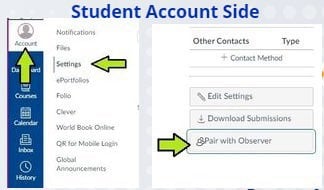
It is recommended that you create the Observer account on the website before using the Canvas Parent app.
Add Pairing Code for Additional Students
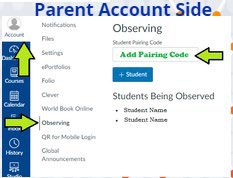
To add additional students to your Observer Account, have your students go to 'Settings' in their account and generate a 'Pairing Code' (same as above).
Add a Pairing Code to your Observer account by going into 'Settings' and adding the generated code.
PWCS Canvas Parent Orientation Course
PWCS has an Orientation course to walk parents through Canvas use: Canvas Orientation for Parents & Guardians. Canvas also has their own documentation to explain how the parent “Observer” role works: Canvas Observer Guide
You can find out more about what the Observer account can do with this Canvas Observer Visibility and Participation chart.